Private, on-device
audio transcription & dictation
for macOS
Your audio never leaves your Mac. Capture system + mic audio, transcribe with on-device AI, and summarize — all privately.
Download DMG
v2.2.0 · Intel: v2.1.0 (last supported — 2.2 requires Apple Silicon)
Also available on iOS
macOS 14+ · Apple Silicon · Free to use
Everything you need for audio intelligence
Powerful features that keep your audio private while delivering professional-grade transcription and dictation.
Live Transcription
Real-time speech-to-text with timestamps. Capture both system audio and microphone simultaneously.
Multiple ASR Models
Qwen3-ASR, MLX Whisper, and more — all running on-device with GPU acceleration. New models added regularly.
Universal Dictation
Dictate anywhere with a hotkey. Editor Mode auto-inserts line breaks after pauses, and voice-triggered Enter lets you control formatting hands-free.
Text Enhancement
Auto-translate, fix punctuation, or apply custom prompts to polish your transcripts in real-time.
Streaming Summary
AI-powered summaries via OpenAI, Gemini, Ollama, or any compatible API. Streams in real-time.
Chat with AI
Ask questions about your transcript. Get instant answers, insights, and action items from your recordings.
Session History
Browse, search, and replay past recordings. Full transcript and summary for every session.
File Transcription
Drag & drop WAV, MP3, MP4, MOV, or M4A files. Batch transcribe your audio and video library.
See Echosy in Action
Every feature runs 100% on your Mac. No cloud, no latency, no compromises.
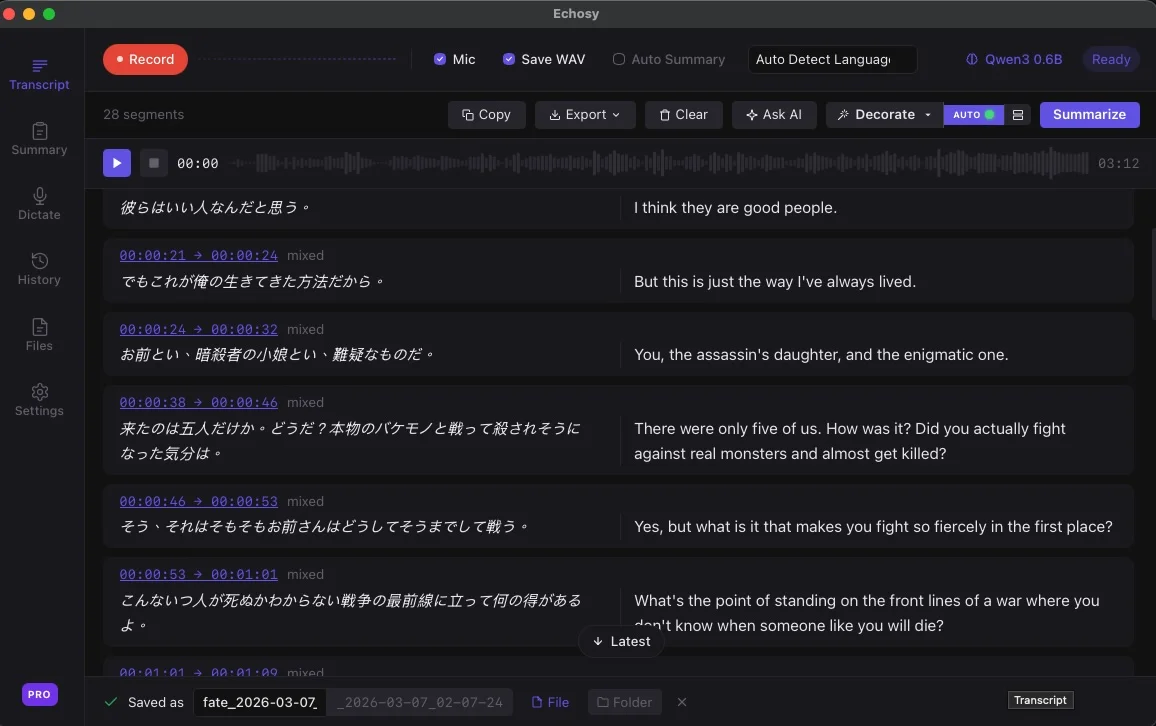
Real-Time Transcription & Translation
Record system audio and microphone simultaneously. Echosy transcribes speech in real-time with timestamps, and decorates your transcript with instant translation — all processed locally on your Mac.
Speak Naturally, Type Instantly
Activate system-wide dictation anywhere on macOS. Your voice is pasted in real-time into any app. With Editor Mode, pauses auto-insert line breaks — and a custom keyword triggers Enter, so you stay hands-free while writing structured text.
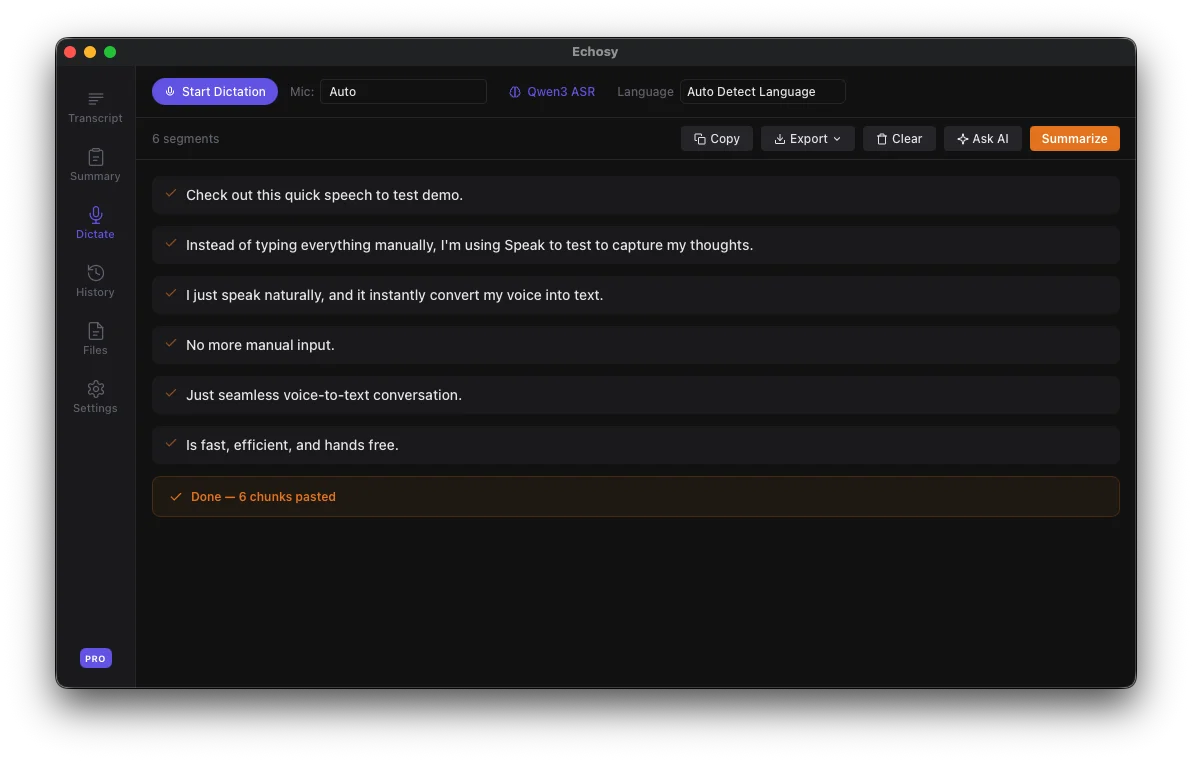
Pause to Break, Speak to Flow
Editor Mode auto-inserts line breaks when you pause — no buttons, no commands. Set a trigger word for instant Enter. Your voice shapes the structure, hands-free.
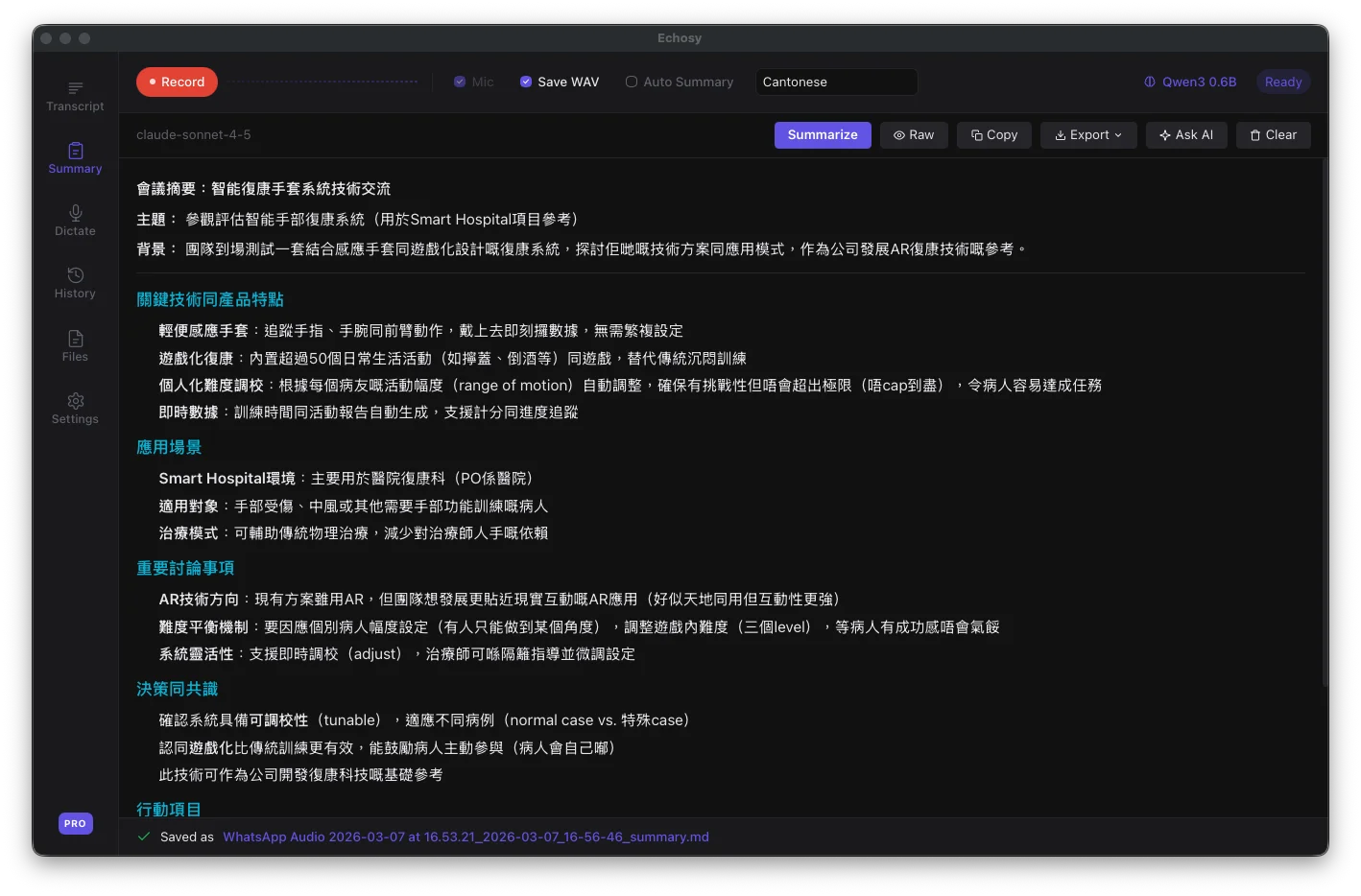
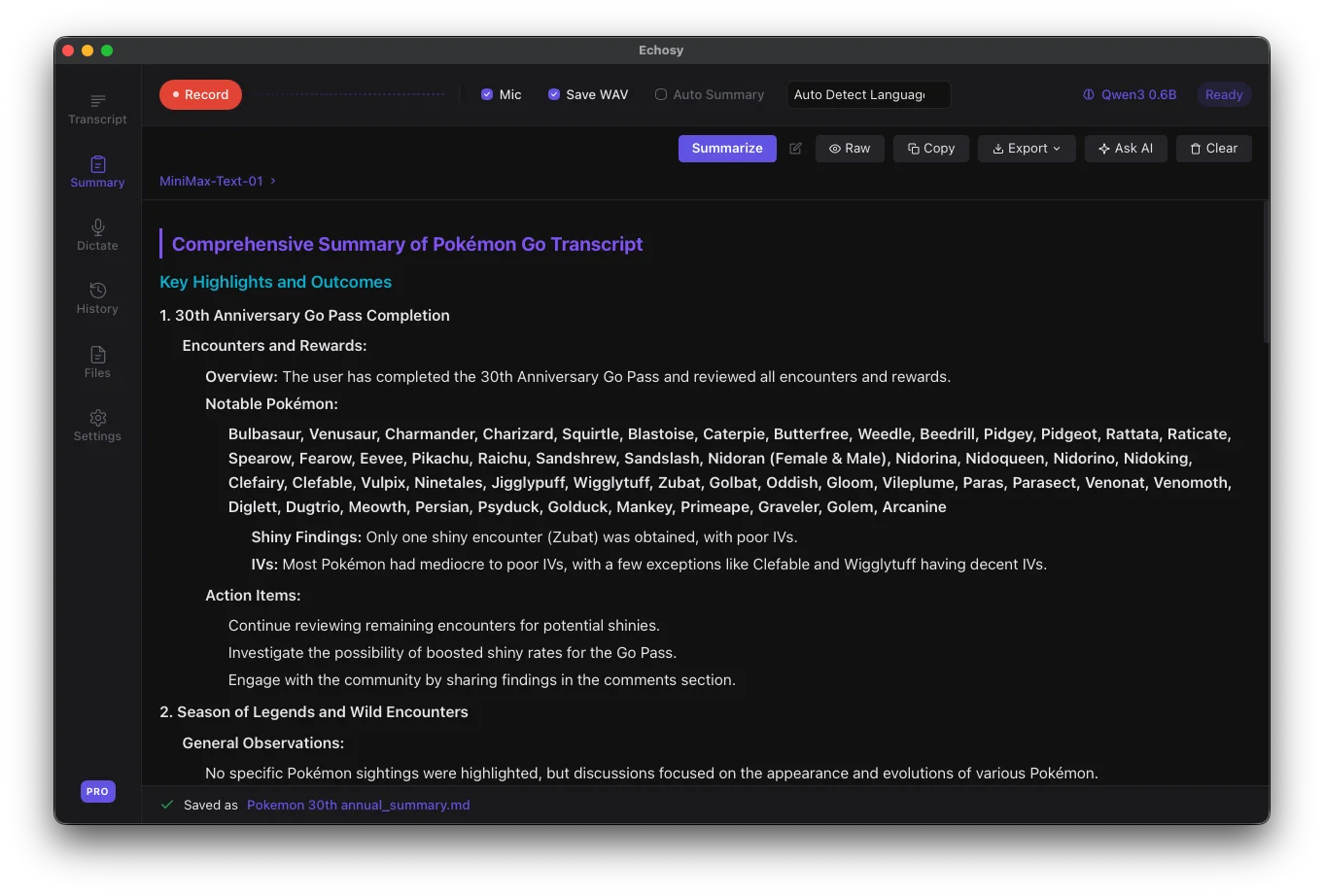
AI Summaries at a Glance
Automatically generate structured summaries from your transcripts using your preferred LLM. Get key highlights, action items, and organized notes — triggered manually or auto-generated when recording stops.
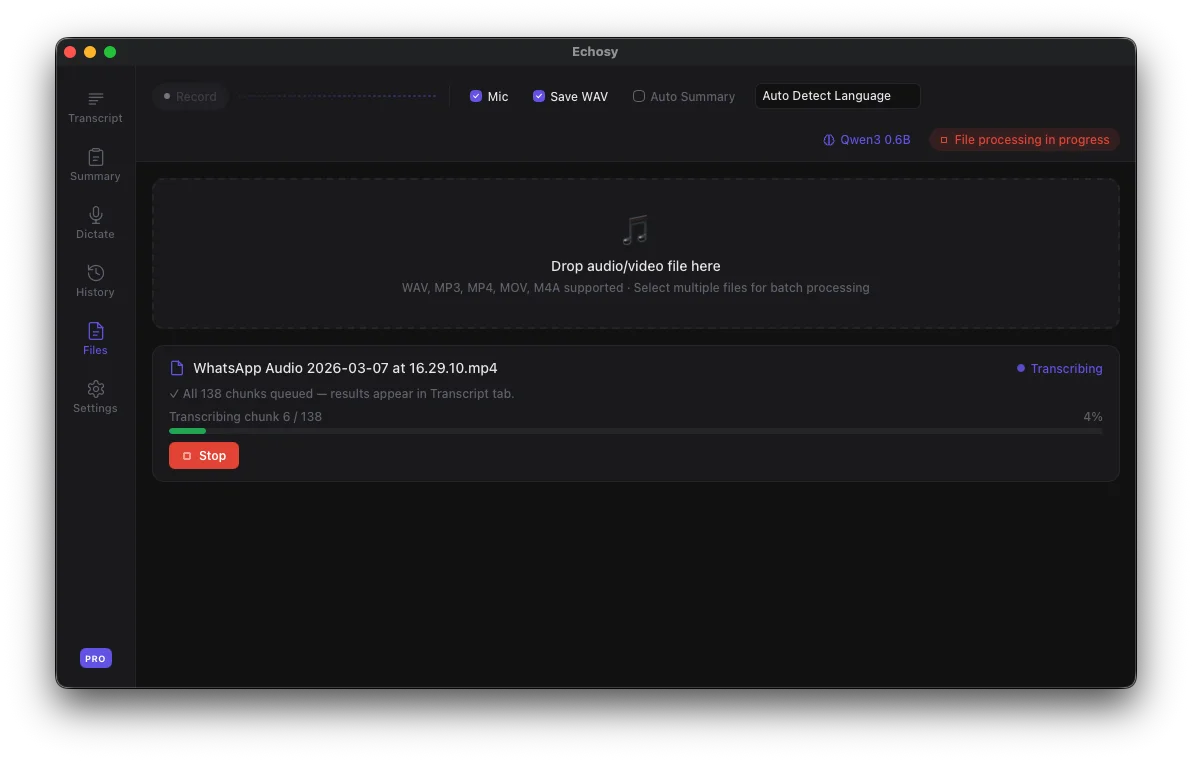
Batch File Transcription
Drag & drop audio or video files for offline transcription. Supports WAV, MP3, MP4, MOV, and M4A with progress tracking and batch processing.
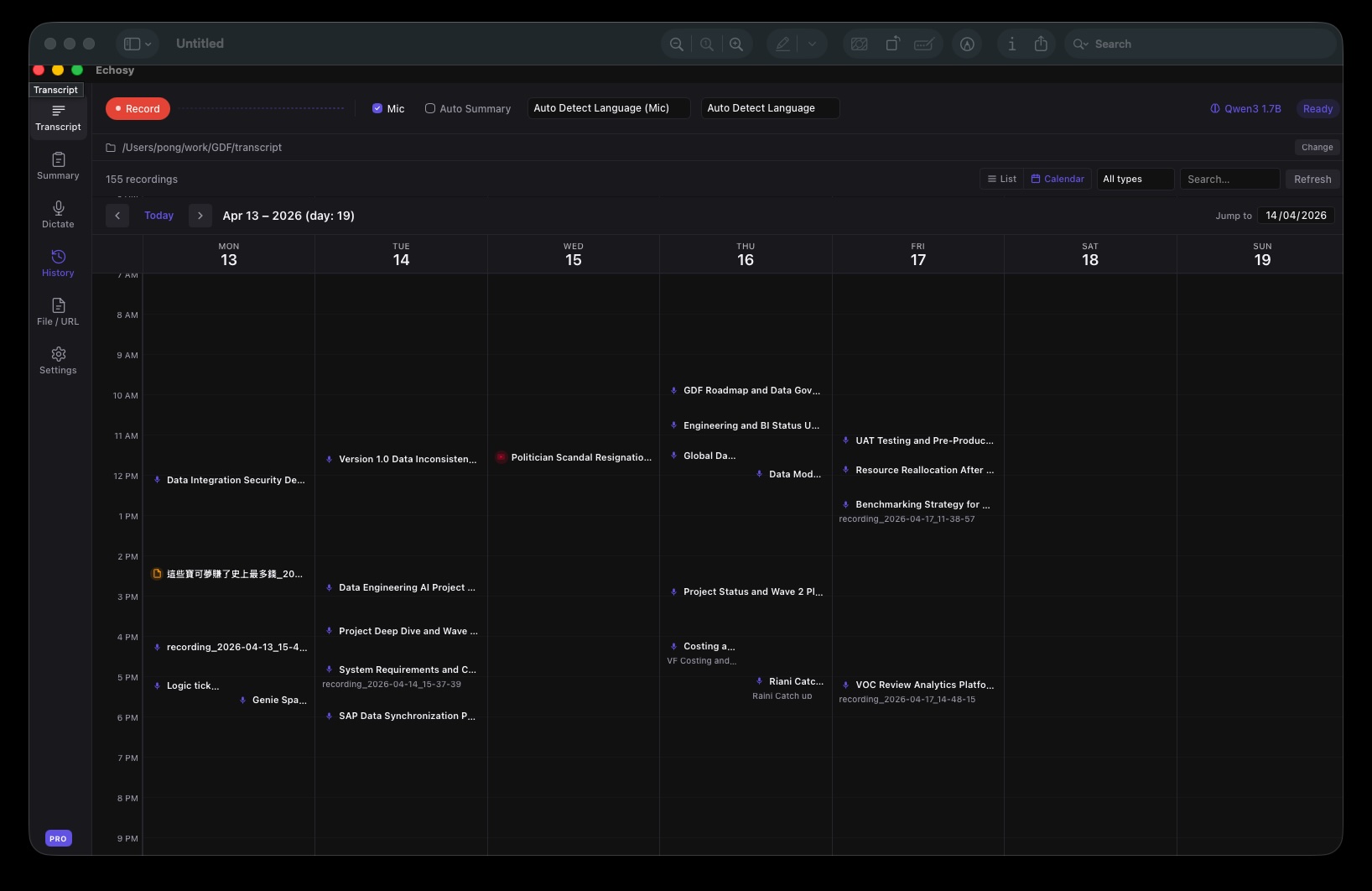
Session History with Calendar View
Browse every past recording in a weekly calendar or a list. Filter by type, search by subject, replay audio, and pick up where you left off.
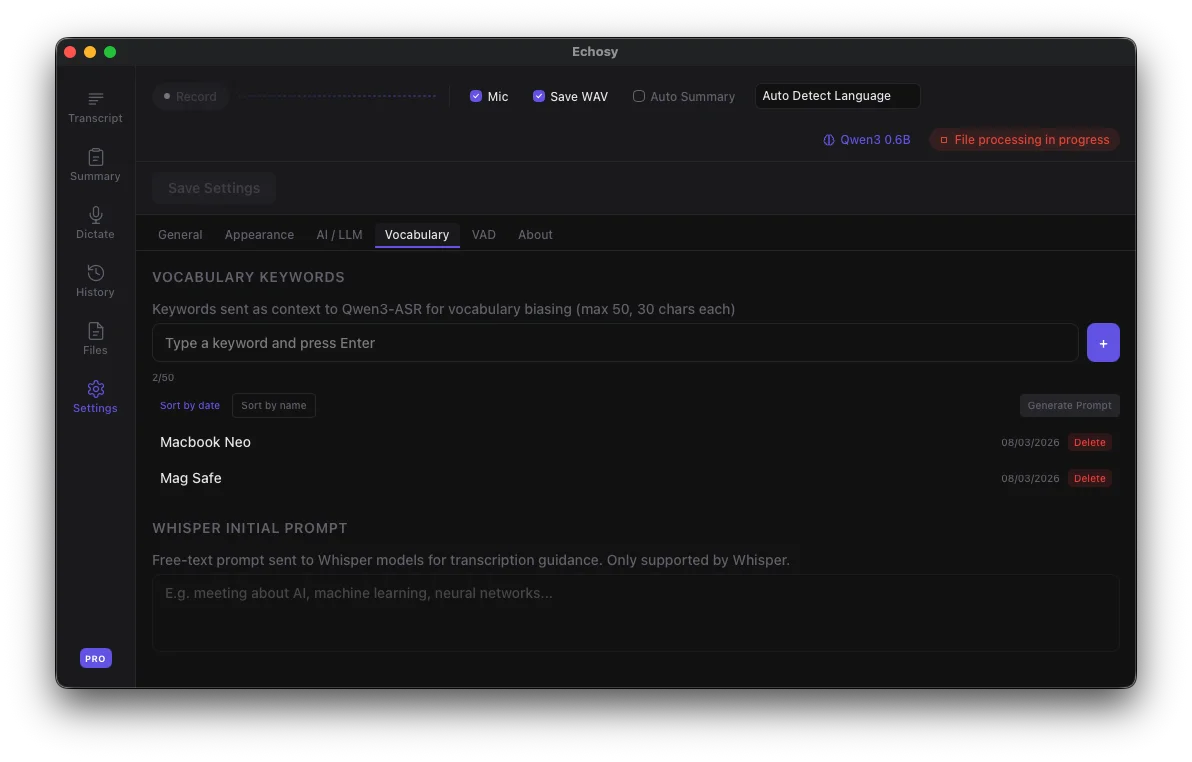
Vocabulary Biasing & Custom Keywords
Add custom keywords and terminology to improve ASR accuracy for specialized content — technical jargon, proper names, or domain-specific vocabulary.
Works with your AI coding agent
Use the Echosy plugin to access meeting transcripts directly from Claude Code, Codex, or any AI coding tool.
Demo showing the Echosy plugin for Claude Code. Available as a skill pack or marketplace plugin.
Built-in on-device LLM support
GEMMA 4
Summarize everything on your Mac.
Echosy 2.0 adds built-in support for Google's Gemma 4 and Qwen 3.5. Pick a model, download it once from inside the app, and run summaries entirely on your Mac — no API keys, no cloud, no data leaving your device.
Private by default
Transcripts and summaries never leave your Mac. Perfect for sensitive meetings, interviews, and confidential work.
One-click download
Choose from Gemma 4 E2B (2 GB) up to Gemma 4 31B, plus Qwen 3.5. Download from inside Settings — no terminal, no Ollama install.
Works offline
After the initial model download, no internet connection is needed. Great for air-gapped environments and travel.
System Requirements
Echosy runs entirely on your Mac. Here's what you need.
Operating System
macOS 14+ (Sonoma)
Processor
Apple Silicon (M1 or newer)
Memory
8 GB minimum
Storage
2–5 GB for models
Network
Not required
On-Device ASR Models
From lightweight to state-of-the-art. All run locally — more models added over time.
Qwen3-ASR: Best-in-class support for Chinese dialects (Cantonese, Hokkien, Shanghainese, etc.)
Recommended Setups
Mix and match ASR + LLM models to fit your workflow and budget.
Offline & Private
100% on-device. No internet needed after setup. Perfect for sensitive content and air-gapped environments.
Qwen3 0.6B
~1 GB · 52 languages · fast
Gemma 4
Built-in support · one-click download
Lightweight Notes
Minimal resources. Great for quick meeting notes on older Macs or when you need speed over accuracy.
Whisper Tiny
~75 MB · 99+ languages · instant
OpenRouter Free
Free tier · no API key cost
Professional Grade
Maximum accuracy for business meetings, interviews, and professional transcription workflows.
Qwen3 1.7B
~2 GB · best accuracy · 52 languages
OpenAI GPT-5.4
Best-in-class summaries
Supported LLM Engines
Use the built-in engine for zero-setup local inference, any OpenAI-compatible API, or Ollama.
Echosy Internal
100% LocalBuilt-inOpenAI
Google Gemini
Claude
Ollama
100% LocalGroq
OpenRouter
The built-in engine supports Gemma 4 and Qwen 3.5 on Apple Silicon. Ollama or cloud providers work on any Mac.
Capture Audio from Any App
Echosy uses macOS ScreenCaptureKit to capture system audio from any application.
Works with any app that plays audio — meetings, music, videos, podcasts, and more.
Simple, transparent pricing
Start free with powerful on-device transcription. Upgrade to Pro or Max for unlimited everything.
Pro
Pay once, use forever
Enterprise
Required for business, team, or commercial use. Custom deployment, priority support & dedicated onboarding.
| Feature | Free | Pro |
|---|---|---|
| Recording length | 15 min/session | 4 hours/session |
| ASR models | Qwen3-ASR 0.6B | All models |
| Dictation length | Unlimited | Unlimited |
| AI summaries | 3/day | Unlimited |
| AI chat | 3/day | Unlimited |
| Dictation Editor Mode | ||
| Vocabulary biasing | ||
| Real-time translation | ||
| Auto-punctuation & correction | ||
| Custom prompts | ||
| Export formats | MD, TXT | MD, TXT, SRT, VTT, DOCX, PDF |
| File transcription | ||
| Session history | Unlimited | Unlimited |
| Devices | — | Up to 3 devices |
| License scope | Personal use only | Personal use only |
Free and Pro licenses are for personal, non-commercial use only. Business, team, or commercial use requires an Enterprise license.